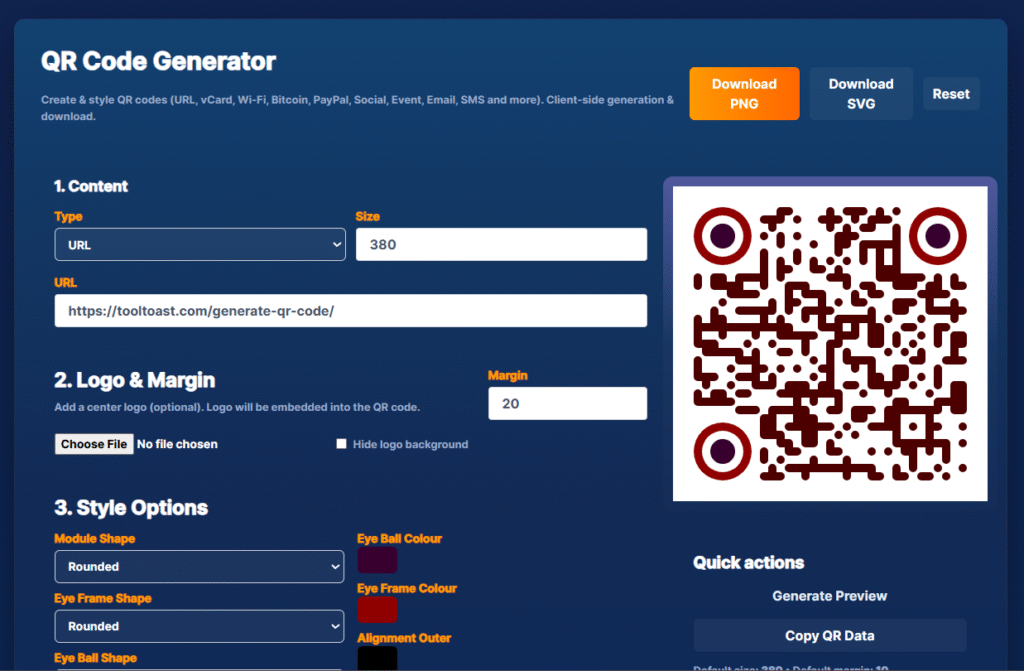
Create Stunning QR Codes Instantly with ToolToast – Free, Fast & Fully Customizable
Need a quick way to create stylish QR codes for your business, Wi-Fi, or crypto wallet? ToolToast’s QR Code Generator makes it effortless. In today’s fast-paced digital world, QR codes are indispensable. They bridge the gap between physical and digital, allowing instant access to information with a simple scan. Whether you’re a small business owner, an event organizer, or just want to share your Wi-Fi password easily, a custom QR code is your perfect solution. But who wants complicated software or hefty subscriptions? Enter ToolToast’s Free QR Code Generator – your go-to online QR creator for speed, style, and simplicity.
At ToolToast, we believe powerful tools should be accessible to everyone. Our QR Code Generator online is designed with you in mind: intuitive, feature-rich, and completely free. Let’s dive into what makes our tool the best QR code generation solution for your needs.
✨ Feature Highlights of ToolToast’s QR Code Creator
Our QR creator isn’t just another basic tool. We’ve packed it with functionalities to help you make truly effective and eye-catching QR codes:
- 🔗 Versatile Content Types: Generate QR codes for almost anything!
- **URL:** Perfect for websites, landing pages, or social media profiles.
- **Text:** Share quick messages or information.
- **Email:** Create a QR code that opens an email draft.
- **Phone:** Direct users to call a number instantly.
- **SMS:** Pre-fill an SMS message and recipient.
- **Wi-Fi:** Make it easy for guests to connect to your network (your generate wifi qr code solution).
- **vCard:** Share your contact details with a vcard qr code generator.
- **Location:** Link directly to a map location.
- **Bitcoin:** Facilitate crypto payments with a bitcoin qr code.
- **PayPal:** Quick links for PayPal payments.
- **Event:** Add calendar events with a scan.
- 🎨 Customization Options: Go beyond basic black and white!
- **Colors:** Choose foreground and background colors to match your brand’s qr style.
- **Eye Frame & Dot Style:** Customize the look of your QR code’s ‘eyes’ and data dots for a unique aesthetic. Our circle qr code generator features let you soften the look.
- **Logo Integration:** Embed your brand’s logo directly into the center of your QR code. Your logo qr code generator is here!
- 🖼️ Multiple Download Formats: QR download in PNG, JPG, SVG, and EPS for all your printing and digital needs.
- ⚡ Fast & Free: No registration, no hidden costs. Just pure, efficient qr code generation.
- 📊 Static QR Codes: Reliable static qr code generator for content that won’t change often.
- 🚫 No Login Required: Get straight to creating your QR codes without any hassle.
- **Intuitive Interface:** Our tool is built for ease of use, making qr code generator web an absolute breeze.
- **Hover Effects:** Buttons animate on hover, ensuring a smooth and responsive user experience.
📝 Step-by-Step Guide: How to Generate Your Custom QR Code with ToolToast
Creating your perfect QR code with ToolToast is incredibly easy. Follow these simple steps:
- Visit Our QR Code Generator: Navigate to tooltoast.com/generate-qr-code/.
- Select Content Type: On the left-hand panel, use the dropdown menu to choose what type of content your QR code will hold (e.g., URL, Text, Wi-Fi, vCard, Bitcoin, etc.).
- Enter Your Data: Depending on your selected type, fill in the required information in the input fields provided (e.g., your website URL for a URL QR code, your Wi-Fi name and password for a Wi-Fi QR code).
- Customize Your QR Code (Optional but Recommended!):
- Colors: Click on the color pickers to choose your desired foreground and background colors.
- Eye & Dot Style: Experiment with different eye frame and dot styles to give your QR code a unique look.
- Add Logo: Upload your brand’s logo image to embed it in the center of your QR code.
- Preview Your QR Code: As you make changes, your QR code will update in real-time on the right side of the screen. This qr code generator personalized preview ensures you get exactly what you want.
- Download Your QR Code: Once you’re happy with the design, click the “Download QR Code” button. Choose your preferred format (PNG or SVG) for high-quality qr download.
That’s it! You now have a custom, functional QR code ready to be used anywhere.
🚀 Boost Your Marketing & Connectivity Today!
Whether you’re creating a website qr code generator link for your business cards, a facebook qr code generator for your social media, or a simple generate url qr code for an event poster, ToolToast makes it simple. Our tool is the best qr code generator free you’ll find, offering advanced features without the price tag.
Ready to experience the easiest qr code generator for free? Start generating your custom QR codes now—no login required! Explore the power of instant connectivity with ToolToast’s Free QR Code Generator today!
Don’t forget to check out our other free online tools to further boost your productivity!
I’ve tried a few QR generators before and some required accounts or hidden fees. This comparison pointed out the difference between static and dynamic codes very clearly. ToolToast gave me a static QR code that won’t expire, which is ideal for my printed flyers. The review was honest and helped me choose without wasting time.
As someone who runs a small cafe, I wanted a simple QR code for the menu without paying for complicated tools. After reading this post, I tried the ToolToast generator — zero sign-up and unlimited scans is such a relief. No analytics is fine for me right now; the important thing is a reliable QR code that always works.